How to Export JSON to Google Sheets
Transform your JSON data into Google Sheets in seconds. Follow this simple tutorial to convert and export your JSON files to Google Sheets for easy analysis and collaboration.
Watch the Tutorial
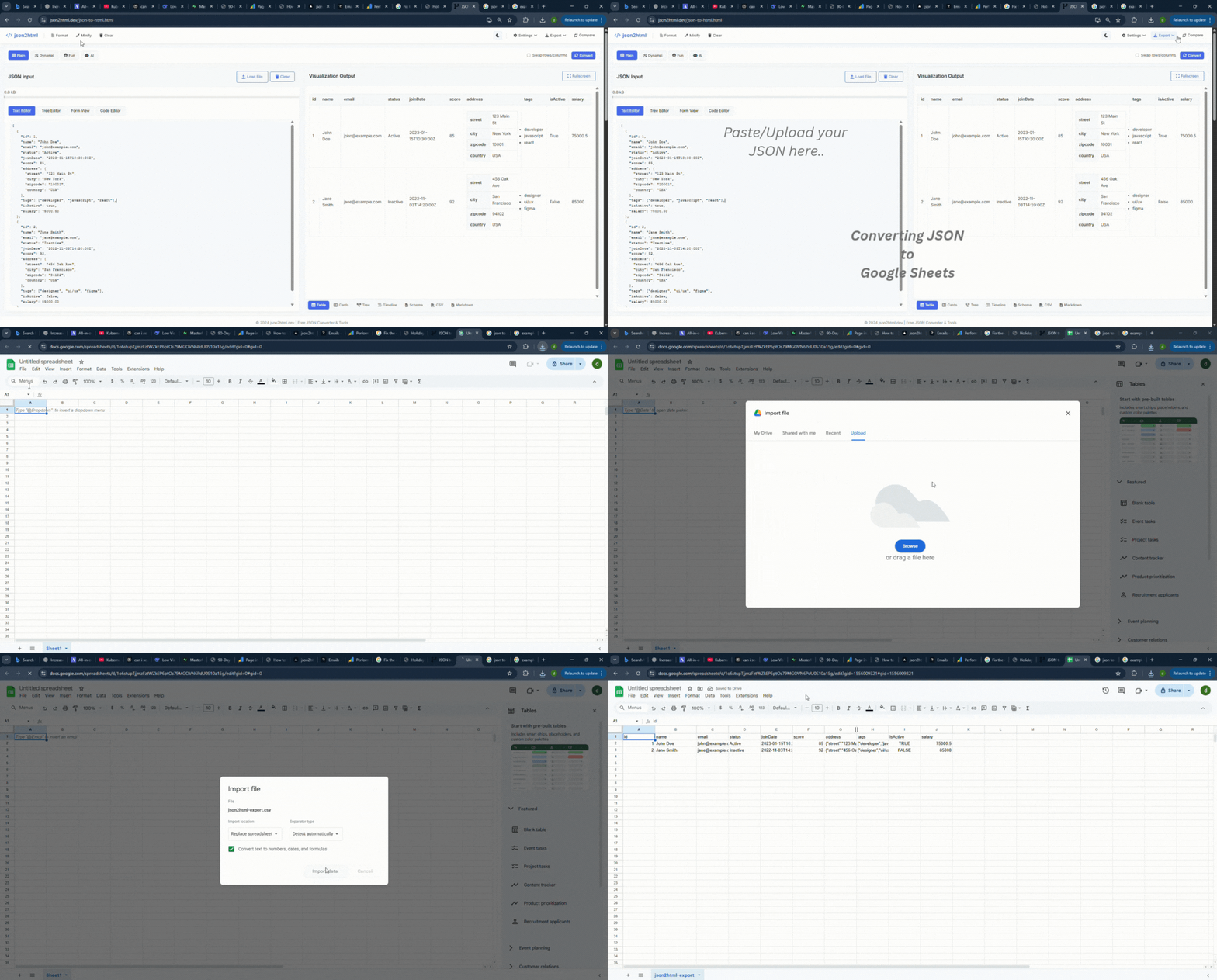
Follow along with this visual guide showing the complete process of converting JSON to Google Sheets:
Step-by-Step Instructions
Step 1: Upload Your JSON
Navigate to the JSON to HTML converter and either paste your JSON data directly or upload a JSON file from your computer.
Step 2: Convert to Table
The tool automatically converts your JSON data into a table format. You'll see your data organized in rows and columns, making it easy to review before exporting.
Step 3: Click Export to Google Sheets
Click the "Export to Google Sheets" button. You may need to sign in to your Google account if you haven't already. The tool will handle the conversion and create a new spreadsheet.
Step 4: Access Your Spreadsheet
Your JSON data is now in Google Sheets! You can edit, share, and analyze your data using all of Google Sheets' powerful features.
Lightning Fast
Convert and export your JSON to Google Sheets in seconds, not minutes.
Secure & Private
Your data is processed securely. We don't store your JSON files.
100% Free
No subscription, no hidden fees. Export unlimited JSON files to Google Sheets.
Direct Integration
Seamlessly integrates with Google Sheets API for instant exports.
Why Export JSON to Google Sheets?
Google Sheets is a powerful tool for data analysis, collaboration, and visualization. By converting your JSON data to Google Sheets, you can:
- Share data easily with team members
- Create charts and visualizations
- Use formulas and pivot tables for analysis
- Access your data from anywhere
- Collaborate in real-time
- Export to other formats (Excel, CSV, PDF)